

Hello, everyone.
This is Enta.
I got a call from a CEO I know.
It's only in Tokyo that people are so busy and short-staffed, right!?
www
That's actually true. No matter what people say, there are no public works projects in the Tokai region, right?
The government probably thinks it’s doing its part, but both prime contractors and subcontractors are crying out in distress. I suppose these cries of distress won’t reach the government, will they?
Especially for us low-level subcontractors, we’re getting so fed up we’ve lost our voices, lol.
Well, I'm just slowly getting by, like a weed, lol.
But that's beside the point.
You know how sometimes your Excel data just disappears, right?
Actually, that backup from back then is still there.
This is actually pretty common, but there are quite a few people who aren't aware of it.
Older versions of Excel aren't much different, so just for your reference.
Important Things to Keep in Mind Before Creating Data!
When creating a new file, be sure to name and save it first.
And then, there's always that one thing in Excel,Please press the Options button.
Among those options, there is one called "Save."
There"Save auto-recovery data at the following intervals:○○"Every minute"の○○minutes,
If you're using a slow computer and the page keeps freezing, set it to 3 minutes, and you'll be able to go back 3 minutes.
If you have a high-spec computer, go ahead and do whatever you want lol
It takes me about five minutes because I don't like flying and I don't like having to do it over.
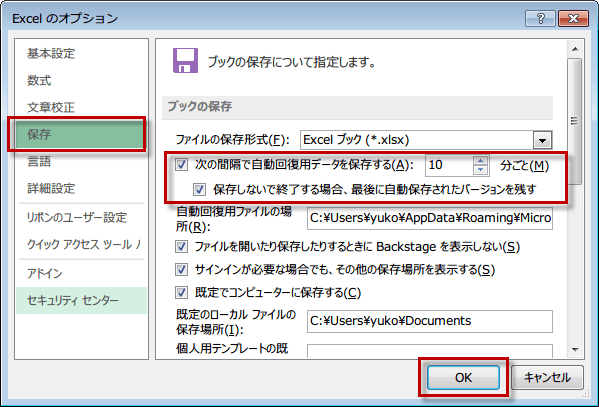
By the way, if you skip ahead, under "Save" in that menu,"Location of the Automatic Recovery File"There is something called...
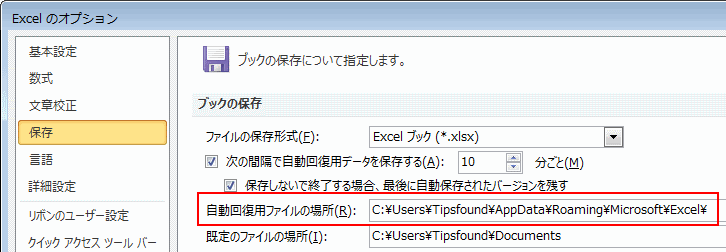
Since there is data backed up in that subfolder,Copy that file, and
Paste it onto your desktop or elsewhere, rename it, and use itPlease do so.
In this day and age, data is everything. If it gets lost, not only do you lose time, but it really takes a toll on your morale, doesn't it!?
To prevent that from happening, always make sure to back up your data!
See you later.
Dealing With It Series (Part 1)
Troubleshooting Series (Part 2): Unusual Noises from the Motor
Troubleshooting Series (Part 3): What to Do If an Anchor Comes Loose