

Hello, everyone.
This is Enta.
I was in Osaka last week.
I’ve been hearing some valuable insights from my former colleagues and friends at the National Tax Agency (who are now tax accountants), and I’m hoping to put them to good use in running my company going forward lol.
There are definitely all sorts of techniques when it comes to paying taxes, but I actually think it’s healthier to have a tax audit every year, so bring it on! lol
I was also able to discuss the issues I'm currently facing.
I want to make sure we pay our taxes in full so we can run the company properly!

But that's beside the point.
There's a piece of software I've been using a lot lately.
I'm actually quite good with computers—better than most people—and I manage other people's computers as well as those from other companies.
I also do a little server administration and a little website maintenance, but,
We sometimes get last-minute messages from people saying they don't know how to use the system.
In situations like that, rather than going back and forth over the phone saying, “It’s not this, it’s that,”
I know it would be faster to go there, show you how to use it, and walk you through it step by step.
But realistically, since I'm at work and it's quite a distance away, it's pretty hard to do.
That's where software called Remote Desktop comes in.
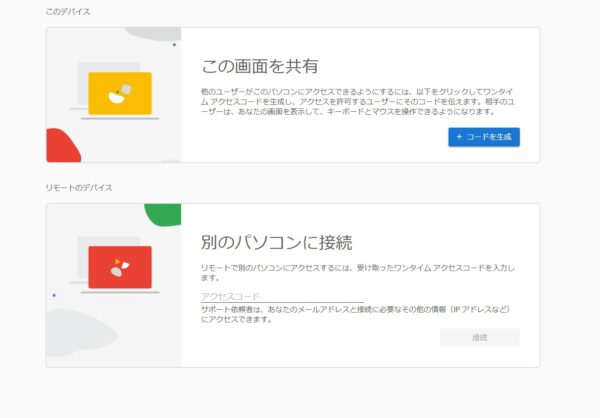
It comes standard with Windows, but Chrome Remote Desktop is even easier to use!
If you use this, you can easily view and control the other person's desktop while working!
Depending on the situation, we can walk you through the steps or help you resolve errors while chatting or on the phone.
The other day, I was using this to teach someone how to create Excel functions remotely, lol.
It's also very handy for teaching people how to use a computer, among other things!
Users install the software on their own PCs and connect by listening for the other party's code.
It's very convenient because you can do this right in your browser. (OS-independent)
Since it's Google's security, I'm pretty sure it's totally fine lol
Well, as long as you're not a large corporation, I think it's a pretty useful piece of software.
However, it's best to use only people you trust as much as possible.
I wouldn't ask a complete stranger to teach me, but,
There are a lot of shady people out there these days who talk their way around things, so be careful lol
In any case, it's very convenient, so I recommend this software to anyone in a position to teach others.
We can provide training on how to use electronic submission software and CAD programs.
I suppose everyone has their own way of using them, but the world of PC usage is sure to continue expanding in the future.
See you later.