

Hello, everyone.
This is Enta.
I got a few calls from people I know asking, “So, how’s that company PC from the other day?” lol
It's taking forever for the lease to end, lol
I think a three-year term is about right for a computer lease.
When you have a 5-year cycle, the fifth year ends up having the worst specs, doesn't it?
I'll describe the environment that allows us to use our software and other tools comfortably.
CAD is probably the main tool you'll be using.
The image becomes particularly pixelated as the drawing size increases.
The software developers are doing their best to prevent that from happening, but it’s inevitable that it will depend on the PC’s specs.
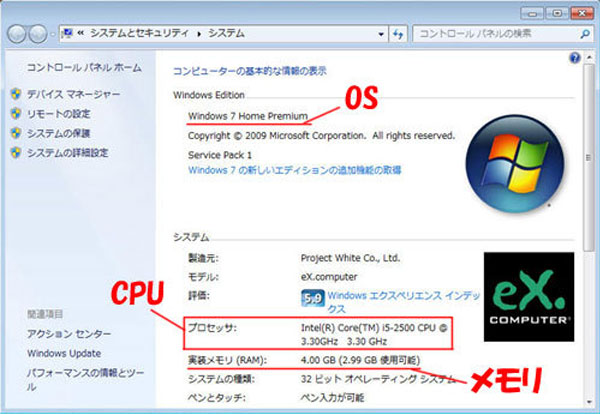
When using CAD software, you should at leastIntel i5 Series CPUsis required.
The i3 really gets on my nerves lol
So, the important thing here is that when it comes to GPUs (graphics cards), I recommend choosing one with as much RAM as possible, but
Since many people are likely to be completely clueless about this topic, please avoid using the onboard GPU as much as possible.
"Onboard" refers to a graphics card that is already integrated into the motherboard.
This one isn't great because its performance is pretty low.
Ideally, you want a PC that comes with a GPU from a manufacturer like NVIDIA or ASUS.
If you search for "GPU speed rankings" or something like that, you'll find out right away.
An SSD is the best choice for a boot drive.
Prices have dropped dramatically lately, so if you install your OS on a 500GB SSD, it’ll be lightning fast.
The other hard drives are 1 TB (one terabyte)
Since modern PCs can handle up to 16 GB of memory, having as much as possible makes processing much smoother, so
Let's install as much as possible. Plus, memory is cheap these days, so I highly recommend it.
Ultimately, the data is transferred from the computer to the cloud.
In my case, I use Dropbox, so all my data is stored in the cloud.
Security is also top-notch. (Even if your computer catches fire, all your data will be preserved.)
After all, as long as I have my laptop with me while I'm on a business trip, my data will be the same as at the office, and
You can also view it on your smartphone.
I have set up my work email to forward messages to Gmail, so I can check them right away.
However, I believe that major companies operate their own servers and run their businesses in compliance with regulations, so,
As mentioned above, using Dropbox and Gmail like that probably wouldn't work, though.
There’s no doubt that for small and medium-sized contractor firms like mine, making full use of IT technology makes things a lot easier.
People are always going on about "data leaks!" or "Dropbox security," but do you even have any data that important?? lol
I think Dropbox's security is actually pretty impressive, don't you? lol
In my case, if someone asks for something I’ve made myself, I’ll give it all away, so even when I hand over documents to the general contractor,
I just naturally do things like uploading files in Excel.
If you're worried about important data, you don't have to upload it to the cloud—you can just save it on a flash drive (USB type) and carry it with you.
Of course, if my computer gets a virus, that's it, lol.

By the way, I know a little bit about computers, too, lol.
That's because all our computers are custom-built desktops.
If you're still unsure about any of that, please email me.
See you later.