

Hello, everyone.
This is Enta, currently on a business trip to Tokyo.
The weather in Tokyo is unpredictable and cold.
That said, it’s a bit out in the sticks, lol.

This week wraps up with trips from Kanazawa to Nagoya by the weekend, but all this traveling is killing me (lol).
But that's beside the point.
When you go on a business trip, you use a laptop, right?
However, it would be great if there were something in my car that could connect to a power source, such as an inverter, but my car doesn't have one.
I mean, that doesn't really happen very often, does it? lol
You can find simple items made from Sugaret at low prices these days, but,
Since I don't have one, I'm very particular about charging my laptop.

How Can I Minimize Laptop Battery Usage?
You might be worried about that, but there’s actually a very simple trick.
Close all system processes, including background programs running on your computerThat's right.
This feature is supported starting with Windows 8 and later versions.
I don't think it's possible before that. (Although there are cases where it can be done using software.)
If you have a spare battery for charging, I think that's fine.
Actually, background programs run on computers to help them boot up quickly.
For people who work at the office every day, faster startup times are preferable, so this isn't a problem, but,
For those who frequently use their laptops outdoors, rather than a fast startup,Batteries Are EverythingRight?
If you're using Windows 8 or later, please give it a try.
The battery life is totally different.
Press the power button to turn it off.
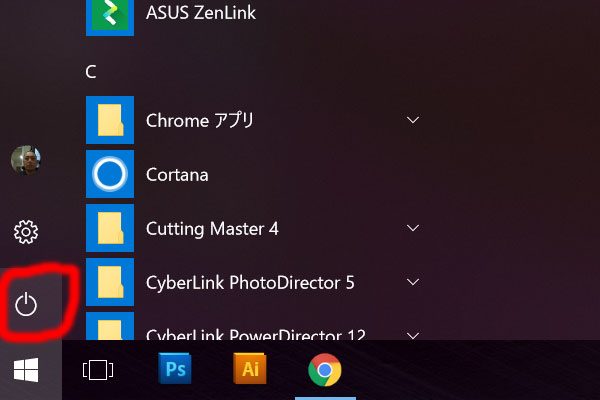
When you do that, the "Sleep, Shut Down, Restart" options will appear.
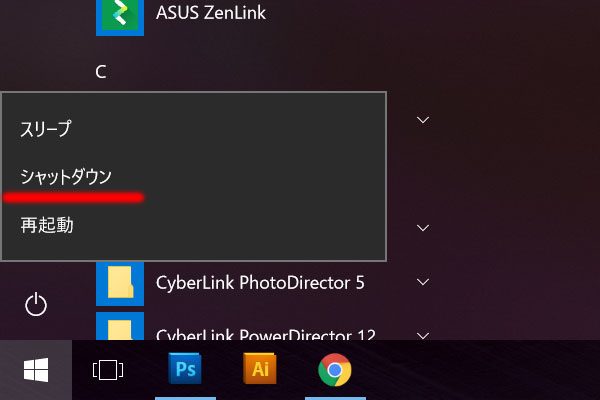
Before pressing this shutdown button, hold down the Shift key on your keyboard.
Once that's done, it's completely finished.
However, it may take a little longer to start up the next time.
Which is more important: battery life or startup speed?
See you later.